


FastCast - TV Cast
4.04.00 Reviews
App Specs
- Version
- 5.0
- Updated On
- License
- Free
- Downloads
- 10,000+
- Developer
- Masivapp
- Categories
- Libraries & Demo
- Platform
- Android
Screenshots
 Analysis by AppCompare
When I want to show something from my phone to a room full of people, a television is often a better screen than passing the phone around. FastCast - TV Cast is aimed at that simple job: sending phone content to a TV. It is a free casting app from Masivapp, and its appeal is easiest to judge by whether it fits the devices and kind of viewing you already use.
What free access means in practice
The app costs nothing to download, so trying it does not require an upfront purchase. That makes it a low-commitment option if you want to see whether casting from your phone is convenient in your home. I would treat “free” as a useful starting point, not as a promise about every possible cost or feature; the practical value depends on whether your TV and phone work smoothly together.
FastCast sits in the libraries-and-demo area rather than being a streaming service with its own catalogue. In other words, it is a way to put phone content on a TV, not a replacement for subscriptions or a source of films and shows. That distinction matters: if you already know what you want to watch, casting may help you view it on a larger display, but it does not itself provide the programme.
Where it can earn a place in your routine
The best case for a casting app is not necessarily a big movie night. I find the everyday moments more convincing: showing a relative a set of photos without handing over my phone, displaying a clip to a few friends, or putting a web page on a screen that everyone can see. These are small conveniences, but they remove the awkwardness of crowding around one handset.
Imagine you have just returned from a day out and want to share a few pictures at the kitchen table. Instead of passing your phone from person to person, you can try sending them to the TV and let everyone look together. For that sort of casual sharing, the important question is not whether an app has a long feature list; it is whether it finds the right screen and makes the connection easy enough to repeat.
A second useful situation is a quick, informal presentation. A web page, a reference image, or a short video can be easier to discuss when it is visible to the whole room. I would still keep the phone nearby and check that the right content is on screen before showing it, especially if I am using a browser. Casting is convenient, but it also means the phone’s display and the TV are part of the same viewing task.
How it compares with built-in casting
Many phones and TVs already offer their own casting or screen-sharing options. If those built-in tools reliably connect to the TV you own, they may be the simplest choice: there is no need to add another app to a job your devices already handle. FastCast is worth considering when you prefer a dedicated casting interface or want to try a separate route for sharing phone content.
Worth Reading Before You Choose

Flipboard Shows What News Apps Must Do Beyond the Feed

Switching to Android Auto Means Rethinking Your Driving Routine

Google Calendar Makes a Crowded Week Easier to Manage

Ludo King Makes the Most of the Minutes Between Plans

Baby Panda World Brings Quick Play to Modern Phones, but Its Game Library Feels Busy

ESPN’s Live Game View Makes Following Close Games Easier
It is also different from opening a streaming service directly on a smart TV. A TV app can be the better option for regular viewing because playback happens on the television itself, without making your phone the centre of the session. A casting app makes more sense when the material starts on your phone, such as personal media or a page you have open. The right choice depends on where the content lives, not on which approach sounds more advanced.
Before settling on any casting method, I would check that the phone and TV can see one another on the network and that the television supports the connection route being used. That is a practical first step, not a guarantee that every TV will be compatible. If a screen does not appear, checking the devices and their network connection is more useful than repeatedly tapping the cast control.
Using FastCast day to day
I find the most useful way to judge FastCast in everyday life is to test it with the exact phone, television, and kind of content I plan to share, rather than assuming one successful connection settles everything. A quick check before guests arrive can show whether it suits casual viewing or whether the TV’s own apps will be simpler. From there, I’d weigh the convenience against the trade-offs that shape who gets real value from it.
What to check before you rely on it
FastCast is free and has an Everyone content rating, so it is broadly accessible as an app. It has a 4.0 average from 69 ratings, with 10K+ installs. Those figures can offer a little context about its audience, but they cannot tell me whether it will work with a particular television. Device compatibility and the quality of your home connection are more important to that decision.
The app’s current version is 5.0, and it was released on December 30, 2025. It requires Android 7.0 or later. Those details are helpful if you are checking an older Android phone before installing it. For iPhone users, I would check the relevant app-store requirements on the device rather than assuming that the Android minimum applies to iOS too.
One useful habit is to test casting with something unimportant before planning to show a long video or host a gathering. Try a photo or a short clip first, confirm that the TV is displaying the intended content, and see whether the phone remains responsive enough for your needs. This quick rehearsal can reveal a connection problem while there is still time to switch to a built-in TV app or another method.
Trade-offs that matter more than a feature list
Casting is only as convenient as the connection between the devices. A busy or unreliable home network can interrupt the experience, and a TV that does not appear as an available destination can turn a quick share into troubleshooting. I would not choose this as the only plan for an important presentation or a time-sensitive viewing session until I had tested it with the exact phone and television I intended to use.
There is also a difference between sending an item to a TV and using a phone as the source for everything. The phone may need to stay nearby, and using it for other tasks while something is playing may be less comfortable than starting the same content directly on the television. If your goal is hands-off viewing, a TV’s own playback apps may suit you better. If your goal is to show something already on your phone, casting can be the more direct route.
For web content in particular, I would think about what is visible before connecting to a shared screen. Close or move away from anything personal, then open the page you actually intend to display. This is a simple privacy-minded workflow that applies to casting generally; it helps avoid exposing unrelated phone content while people are watching the television.
Who is likely to get value from it?
I would recommend giving FastCast a try if you often share photos, videos, music, or web content from a phone and want a dedicated casting option to test. It is a particularly sensible experiment when you are not ready to pay for an app and are comfortable checking whether your TV works with it. Masivapp is the developer, and the app’s straightforward purpose makes it easy to assess through a short trial.
I would skip it, or choose another route, if your television already handles the same job more reliably through its built-in tools. It is also not the answer if you expect it to supply movies, replace a streaming subscription, or make an incompatible TV cast content. For people who primarily watch the same services on a smart TV, opening those services on the TV itself is often less fiddly.
My practical verdict is to treat the free download as a compatibility test rather than an automatic recommendation for every household. If it quickly finds your screen and handles the content you actually want to share, it may be a handy addition. If connection setup becomes a recurring chore, the convenience disappears, and the TV’s own apps or built-in casting are likely the better fit.
Ever been on your phone and thought, "Wow, this would be so much better on a bigger screen"? Yeah, me too. That's where FastCast - TV Cast comes in. It's one of those apps that makes you wonder how you ever lived without it once you start using it.
What's the Deal with FastCast?
So, here's the lowdown. FastCast - TV Cast is an app that lets you cast your phone's content directly to your TV. It's like magic, but without the wand. The app is available on both Android and iOS, so no worries if you're team Apple or Android. The setup is super straightforward, even if you’re not exactly tech-savvy. You just need your phone, a TV, and a decent Wi-Fi connection. Bam! You're good to go.
Getting Started
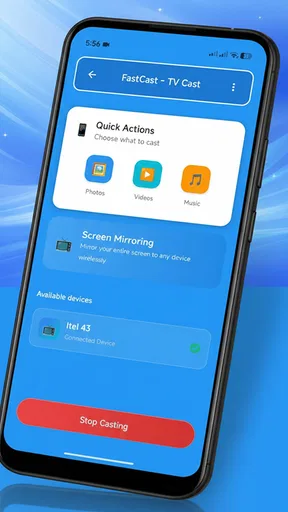
Once you download the app, the interface is pretty intuitive. It's got that clean, no-nonsense look that's not trying to be all flashy. You basically have a few options on the main screen: photos, videos, music, and web. Pick what you want to cast, and you’re halfway there. The app automatically searches for available devices, and as long as your TV is compatible, it pops right up.
The Features You'll Love
What really sets FastCast apart is its versatility. I mean, you can cast pretty much anything. From your cherished family videos to your latest Spotify playlist, it’s all up for grabs. And let's talk about the web casting feature. You can cast web pages directly. So, if you're streaming a movie online, it's just a few taps away from being on your TV.
Another cool feature is the ability to use your phone as a remote. This means no more lost remotes or dealing with buttons that don’t work. You can also adjust the volume or pause the video right from your phone. Honestly, it’s like having a mini command center in your pocket.
Performance and Connectivity
Now, I've tried a few casting apps before, and let me tell you, not all are created equal. Some have a lag that makes you want to pull your hair out. But with FastCast, the connection is surprisingly stable. The app runs smoothly, and the casting is almost instant. It's rare to experience any lag, so you won't miss that crucial scene in your favorite show.
Plus, the app supports a range of file formats. Whether you've got MP4s, MKVs, or even some obscure format, FastCast handles it like a champ. It's this kind of compatibility that makes it a standout.
The Small Stuff that Matters
One thing I appreciate is the ongoing updates from the developers. They're always tweaking the app to make it better, fixing bugs, and adding new features. It’s reassuring to know that they’re listening to user feedback and making changes that actually improve the experience.
And if you're worried about data privacy, FastCast has you covered. They’ve got encryption in place to keep your data safe, which is a huge plus in this age of privacy concerns.
Final Thoughts
In a nutshell, FastCast - TV Cast is a solid choice for anyone looking to enhance your viewing experience. Whether you're an avid binge-watcher or just want to share your latest vacation photos with the fam, this app makes it all so easy. It's the kind of app that you install and wonder how you ever did without it.
So go ahead, give it a try and let your phone take center stage on the big screen. Happy casting!
Pros
- Easy setup with minimal steps required.
- Supports multiple video formats seamlessly.
- Fast streaming with low buffering time.
- User-friendly interface for all ages.
- Compatible with a variety of devices.
Cons
- Limited free features; premium needed.
- Occasional connection drops reported.
- Ads can be intrusive during use.
- No offline casting capability.
- Requires stable Wi-Fi for best performance.
FAQs for FastCast - TV Cast
What is FastCast - TV Cast and how does it work?
FastCast - TV Cast is an app that allows users to stream multimedia content from their mobile devices to their TV screens. It works by connecting your smartphone or tablet to a compatible TV using the same Wi-Fi network. Users can cast photos, videos, and even mirror their entire device's screen directly to their TV for a larger viewing experience.
Is FastCast - TV Cast compatible with all TV models?
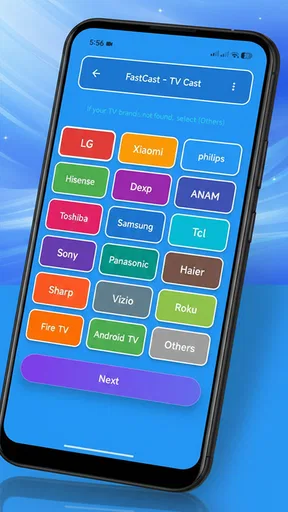
FastCast - TV Cast is compatible with most smart TVs that support casting technologies like DLNA, AirPlay, or Chromecast. However, it's important to check the app's compatibility with your specific TV model before downloading. Some older models may not support the necessary technology for casting, so verifying this can save you time and ensure a smooth setup.
Does using FastCast - TV Cast require an internet connection?
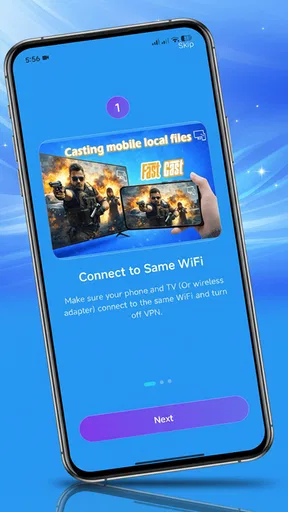
Yes, an internet connection is required to use FastCast - TV Cast effectively. Both your mobile device and TV need to be connected to the same Wi-Fi network for the casting function to work properly. This ensures that your multimedia content streams smoothly and without interruptions during your viewing experience.
Are there any costs associated with using FastCast - TV Cast?
FastCast - TV Cast is available as a free download, but it may offer in-app purchases or features that require a subscription or one-time payment. Users can enjoy basic casting features at no cost, but to unlock advanced functionalities or remove ads, a purchase may be necessary. Always check the app’s store listing for detailed pricing information.
Can I control playback on my TV using FastCast - TV Cast?
Yes, FastCast - TV Cast provides playback control directly from your mobile device. You can pause, play, skip, or adjust the volume of your content while it is being cast to the TV. This feature allows for a seamless viewing experience without needing to use your TV remote, making it convenient and user-friendly.


